Cricut Explore vs Maker for Sticker & Vinyl Etsy Shops (2026 Buyer’s Guide)
Explore 5 / Maker 5 and prior models—Print Then Cut stickers vs HTV apparel, tool differences that matter, and a clear buy path for 2026.
Building an Etsy shop around stickers, vinyl decals, and HTV apparel usually leads to one machine question: Cricut Explore or Cricut Maker?
As of 2026, Cricut’s current full-size consumer lineup centers on Explore 5 and Maker 5 (with Maker 4 and Explore 4 still widely sold or discounted, and older Explore 3 / Maker 3 / Explore Air 2 common as refurbished or used). The Explore-vs-Maker decision is still the same: do you need Maker-only tools and thicker materials, or is Explore enough for stickers + vinyl + iron-on?
This guide is for sellers—not scrapbook-only hobbyists. We map machines to sticker workflows (Print Then Cut) vs HTV apparel, call out blade/tool differences that actually matter, and give a clear buy/skip path.
We did not run private cut labs or invent “we cut 10,000 stickers” rankings. Specs and street-price bands come from Cricut’s published lineup and publicly listed 2026 retail pricing on major retailers. Confirm live listings before checkout.
Quick picks (2026)
| Need | Pick | Why |
|---|---|---|
| Best for most sticker + vinyl Etsy shops | Cricut Explore 5 (or Explore 4 on deep discount) | Full-size Print Then Cut, vinyl, iron-on, Smart Materials—without paying for Maker tools you may never use |
| Best if you also cut fabric / wood / engrave | Cricut Maker 5 (or Maker 4) | 300+ materials, Adaptive Tool System, rotary/knife/engraving-class tools |
| Best budget used/refurb entry | Explore Air 2 or Explore 3 (certified refurbished when stocked) | Fine for vinyl/HTV/stickers if you accept older form factor / fewer modern conveniences |
| Stickers only, tiny desk | Joy Xtra (not Explore/Maker) | Letter-friendly Print Then Cut in a compact body—mention only; not the apparel workhorse |
| Wide-format batch production | Cricut Venture | Overkill for most new shops; relevant when volume and cut width justify it |
| Model (typical 2026 street)* | Family | Materials (listed) | Approx. new price band* |
|---|---|---|---|
| Explore 5 | Explore | 100+ | Often ~$199 machine-only |
| Explore 4 | Explore | 100+ | Often ~$159–$249 depending on promo |
| Maker 5 | Maker | 300+ | Often ~$349 machine-only |
| Maker 4 | Maker | 300+ | Often ~$349–$399 |
| Explore Air 2 (refurb/used) | Explore (older) | 100+ | Often ~$149 refurbished |
| Maker 3 / Explore 3 (refurb/used) | Prior gen | 300+ / 100+ | Volatile; check stock |
*Approximate bands from Cricut.com and major retailers observed around mid–late 2026. Bundles and Access subscriptions change effective price—verify before buying.
Affiliate link — Amazon · Affiliate link — Cricut
As an Amazon Associate, PressDesk may earn from qualifying purchases.
Who this guide is for
You’re in the right place if you:
- Sell die-cut / kiss-cut stickers, vinyl decals, or HTV shirts/totes on Etsy
- Want one primary 12-inch-class machine for a spare-room studio
- Need to know whether Maker tools are worth the upcharge
Look elsewhere (for now) if you:
- Need true commercial 24" production day-one (evaluate Venture or non-Cricut cutters)
- Only make occasional gift labels (Joy-class may be enough)
- Refuse subscription software ecosystems entirely (know Design Space realities first)
Stickers vs HTV apparel: what the machine must do
Stickers (Print Then Cut)
You print full-color art on a home inkjet, then the Cricut senses registration marks and cuts. Explore and Maker full-size machines both do Print Then Cut. For sticker-focused shops, the Explore vs Maker gap is usually not cut quality on sticker paper—it’s whether you’ll also use Maker-only tools later.
Budget beyond the machine: inkjet that handles your sticker paper, quality printable vinyl/paper, optional laminate, weeding tools, packaging.
HTV apparel
You cut iron-on vinyl (mat or Smart Iron-On on supported models), weed, then heat-press onto garments. Again, Explore handles standard HTV just fine. Maker does not magically press shirts—you still need a heat press for consistent Etsy orders.
Vinyl decals
Permanent/removable adhesive vinyl is core Explore territory. Maker adds little for basic decals unless you add specialty materials.
Seller takeaway: Stickers and standard HTV do not require a Maker. Buy Maker for catalog expansion into fabric/wood/engraving—not for “better stickers.”
Blade & tool differences that matter
Explore family (Explore 5 / 4 / 3 / Air 2)
- Built for popular materials: vinyl, iron-on, cardstock, sticker paper, and 100+ listed materials
- Tool set is smaller (commonly discussed as about six tool types): fine-point blade, deep-point, bonded fabric blade, scoring stylus, pens, foil tools depending on generation
- Drag-knife style cutting for everyday craft materials
- Smart Materials (matless long cuts) on Explore 3 and newer—not on Explore Air 2
Maker family (Maker 5 / 4 / 3 / original Maker)
- Listed for 300+ materials and a larger Adaptive Tool System (on the order of 13 tools)
- Higher cutting force (Cricut markets Maker force as a major multiple of Explore)
- Tools that Explore doesn’t use: Rotary Blade (unbonded fabric), Knife Blade (thicker/denser materials like balsa/basswood within rated thickness), engraving, debossing, scoring wheels, and more
- Same everyday vinyl/HTV/sticker jobs as Explore—plus craft categories many apparel-only shops never touch
Seller translation: If your next 12 months are stickers + decals + HTV tees, Explore tools cover the money-makers. Pay for Maker when fabric-without-backing, wood charms, engraving, or similar SKUs are real catalog plans—not hypothetical “someday” hobbies.
Materials: what Etsy shops actually buy
| Material / workflow | Explore | Maker |
|---|---|---|
| Printable sticker paper (Print Then Cut) | Yes | Yes |
| Adhesive vinyl / Smart Vinyl* | Yes | Yes |
| Iron-on / Smart Iron-On* | Yes | Yes |
| Cardstock labels & packaging extras | Yes | Yes |
| Bonded fabric | Limited / bonded blade path | Stronger fabric options + rotary |
| Unbonded fabric (rotary) | No | Yes (tool) |
| Thin wood / dense materials (knife) | No | Yes (within rated limits) |
| Engrave / deboss | No | Yes (tools) |
*Smart Materials matless cutting: Explore 3+ and Maker 3+ class machines—not Explore Air 2.
Model naming cheat sheet (2026)
Stay accurate when shopping used listings:
- Explore Air 2 — popular older Explore; dial interface era; no Smart Materials
- Explore 3 — Smart Materials + faster cutting vs Air 2; widely discussed 2021-gen
- Explore 4 / Explore 5 — current Explore generation path; Explore 5 is the compact/value-forward 2026 Explore (Cricut positions it for stickers, shirts, cards, vinyl)
- Maker (original) / Maker 3 / Maker 4 / Maker 5 — Maker line with Adaptive tools; Maker 5 launched 2026 as the latest flagship Maker with a more compact footprint
- Joy / Joy Xtra / Joy 2 — compact; great for small stickers/labels, not a full apparel cutter substitute
- Venture — wide-format / batch-oriented
There was no “Maker 2.” Used Marketplace titles are messy—match the exact model name on the machine and in Design Space.
Comparison table
| Explore 5 (typical) | Maker 5 (typical) | |
|---|---|---|
| Role | Popular projects machine | Widest tool/material machine |
| Listed materials | 100+ | 300+ |
| Print Then Cut stickers | Yes | Yes |
| HTV apparel cuts | Yes | Yes |
| Smart Materials | Yes | Yes |
| Rotary / knife / engrave | No | Yes (compatible tools) |
| Approx. machine street price* | ~$199 | ~$349 |
| Best Etsy fit | Sticker + vinyl + HTV shops | Mixed craft + specialty materials |
*Confirm live price; bundles inflate totals.
Affiliate link — Amazon Explore · Affiliate link — Amazon Maker
When to buy which
Buy Explore (5 or 4) if…
- Stickers and vinyl are ≥80% of revenue plans
- HTV shirts use standard iron-on, not fabric appliqué empires
- You want to put savings into ink, sticker paper, laminate, blanks, and a heat press
Buy Maker (5 or 4) if…
- You already know you’ll sell fabric, wood, engraved, or debossed items
- You’re consolidating multiple craft niches into one machine
- The upcharge is smaller than buying a second specialty tool later
Consider refurbished Explore Air 2 / Explore 3 if…
- Budget is tight and your SKUs are basic vinyl/HTV/Print Then Cut
- You accept older hardware and verify blade/mat compatibility
Skip upgrading Explore → Maker when…
- Your only complaint is weeding time or press quality—those aren’t solved by Maker tools
- You haven’t validated sticker or shirt demand yet
Beginner decision tree
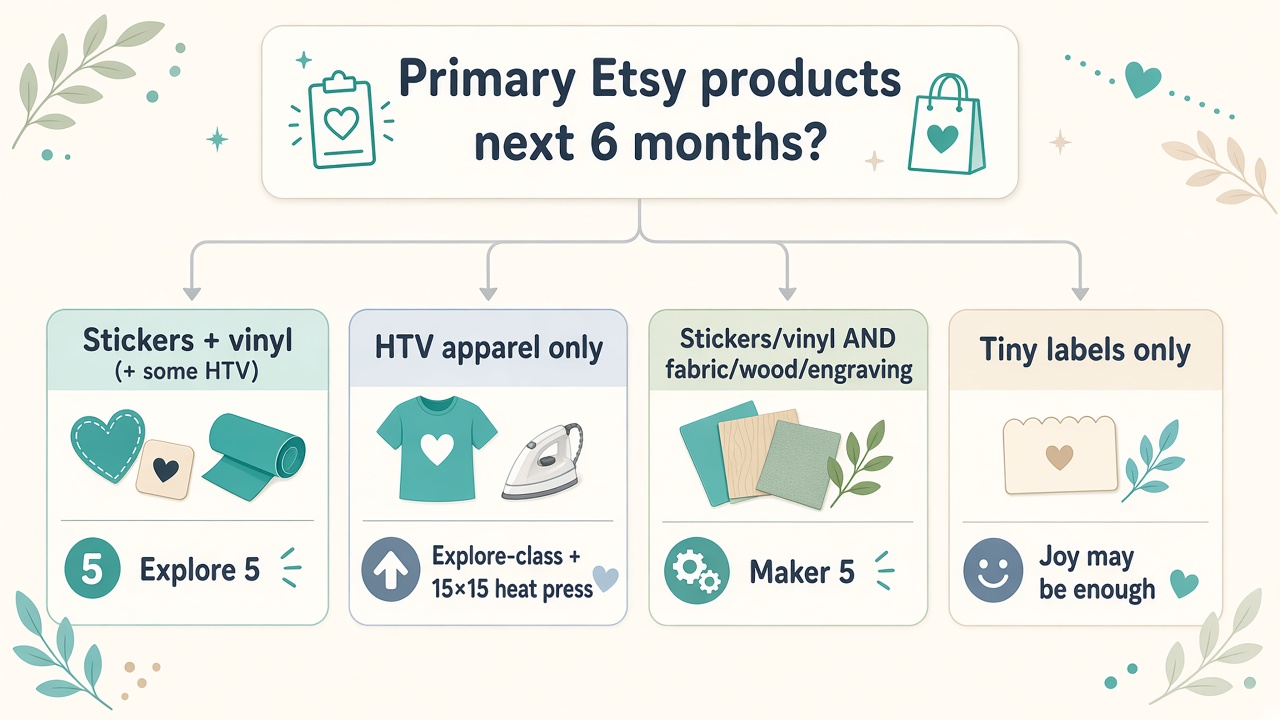
Primary Etsy products for the next 6 months?
-
Stickers + vinyl (+ some HTV)
Explore 5 — or Explore 4 / a good refurbished Explore 3.
-
HTV apparel only
Explore-class cutter + 15×15 heat press — don’t skip the platen press for orders.
-
Stickers/vinyl and fabric, wood, or engraving
Maker 5 — or Maker 4 if the tool set matches your materials.
-
Tiny labels only (no adult tees)
Joy Xtra / Joy 2 may be enough — not covered in depth in this guide.
Common mistakes
- Buying Maker “just in case” before stickers sell — unused knife blades don’t pay rent
- Under-budgeting the inkjet + paper for Print Then Cut — machine is half the sticker stack
- Skipping calibration — failed sticker cuts are usually registration/paper, not “need a Maker”
- Using an EasyPress as your only apparel tool at volume — fine for samples; orders want a platen press
- Ignoring Smart Materials compatibility when buying Air 2 vs 3+ used
- Bundle bloat — Access trials and material kits are fine; don’t confuse them with business ROI
- Listing laminate finishes you haven’t wash- or wear-checked yourself — returns follow
Starter setup beyond the machine
- For stickers: inkjet, printable vinyl/paper, optional laminate, packaging
- For HTV: weed tools, HTV rolls, 15×15 heat press, PTFE sheet, blanks
- Mats & blades: extras of the grip you use most; fine-point blade backups
- Lighting + alignment for weeding sessions
- Care / apply cards for decals and shirts
FAQ
Is Maker better for stickers than Explore?
For standard Print Then Cut sticker paper, no meaningful advantage for most shops. Same workflow class; spend the difference on materials.
Can Explore cut HTV for Etsy shirts?
Yes. Pair it with a proper heat press.
Do I need Explore 5 specifically?
Explore 5 is the current value/new Explore positioning in 2026. Explore 4 or a solid Explore 3 can still run a shop—compare price, Smart Materials needs, and condition.
What about Maker 3 vs Maker 5?
Newer Makers refine footprint/workflows and keep the wide material/tool story. Buy current if paying near-new prices; buy prior-gen only at a clear discount and confirm tool compatibility for your projects.
Does Design Space require a subscription?
You can cut your own uploaded designs with machine ownership; Cricut Access is optional content/features. Read current terms—policies change.
Should sticker shops buy Venture?
Only when cut width and batch speed are proven bottlenecks. Most starters should not.
How we chose (method, not lab theater)
PressDesk compared Explore vs Maker for Etsy sticker/vinyl/HTV shops using: (1) 2026 model lineup and listed capabilities, (2) tool/material differences that change product catalogs, (3) approximate street-price bands, and (4) workflow fit for Print Then Cut vs iron-on apparel.
We did not invent cut-quality scorecards or paid rankings. Confirm the live listing, exact model name, and bundle contents before you buy.
Final recommendation
- Sticker + vinyl + standard HTV Etsy shop: Explore 5 (or Explore 4 / quality refurb Explore if the deal is real)
- Also selling fabric/wood/engraved goods: Maker 5 (or Maker 4)
- Put leftover budget into inkjet supplies, laminate, blanks, and a 15×15 heat press—those move order quality more than an unused knife blade
Choose the machine that matches this year’s SKUs. Upgrading later is normal; overspending on day one is optional.
Affiliate link — Amazon · Check live prices and exact model names before you buy.
Affiliate disclosure: PressDesk may earn a commission if you purchase through links on this page, at no additional cost to you.